⏮️ Previous chapter: Pattern #2: Retrying Celery Tasks from Page 47
A circuit breaker was not the first thing we wrote for our HTTP requests. It took us several years, before we clearly saw the benefits we could reap.
A circuit breaker seems like a “good-manners”-type of thing. A thing you do, to make life easier for a different company, not yourself. Soooo, obviously, it is only rarely built. :-P
In this post
What is a Circuit Breaker pattern?
A circuit breaker is a check that stops my app from repeatedly sending API requests to somebody else’s app, when I detect that the external API is down.
On the face of it, it has basically no benefits for us. If some external API is overwhelmed or down, but we keep calling it, then that API returns some sort of 500-responses. My code is already written in a way that it can handle 500 responses, an API can be perfectly healthy and still return a 500-response, so 500 responses are already taken care of. So, if I’m handling 500-responses just fine, if 500-responses don’t hurt my app at all, then why would I bother building a circuit breaker?
Why even bother with a circuit breaker?
Because in reality, my app handles 500-responses poorly. It handles them in the sense that my app doesn’t die, if it receives a 500, but it also doesn’t do anything meaningful about it.
On top of that, my app can very easily be overwhelmed by too many 500-responses. One 500-response or two aren’t a big deal, but hundreds every minute, or just “all of them all the time”, definitely can be.
The usual way to “handle a 500 response” is to catch the error and return None or whatever the equivalent to “nothing” is.
response = requests.get(....)
if 500 <= response.status_code < 600:
  logger.warning(....)
  return None
It’s not the most sophisticated way to do it. It doesn’t do much more than preventing my code from crashing.
But we don’t call the remote API for fun. We call it because a feature relies on the remote API’s data. So, … no data … no feature.
Connected outages
Let’s say our feature is to measure the average review time of PRs. For this we fetch PRs from GitHub. Let’s say we call the API every 5 mins to collect data.
But of course, we don’t have one customer, we have hundreds and each customer has multiple repos. So, every 5 minutes, we make 1 API request per repository, per workspace, per integration. We do this “in the background” of course, in Celery tasks. Every 5 minutes we start out 500 Celery tasks, each hitting the same API endpoint with different filtering.
Now GitHub goes down for 16 minutes. It’s overloaded, so the requests mostly just timeout (we don’t even get a 500 response).
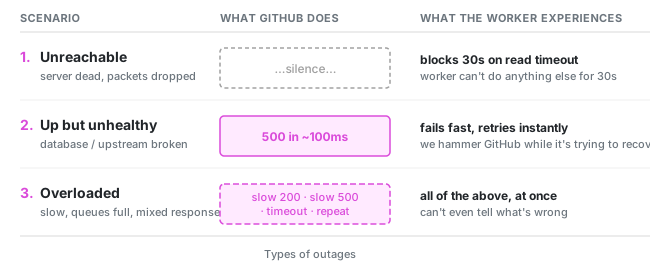
Without a circuit breaker, every single one of those tasks does the same dance: sends the request, waits for the socket to time out, fails, get rescheduled by Celery. Every task holds a worker hostage for the duration of its timeout. Thus, the tasks pile up in the queue faster than workers can drain them. And the workers that are free are all busy waiting on a dead socket, doing nothing. Meanwhile, all our other Celery tasks, which have nothing to do with any of this, can’t get a worker either, because the workers are all stuck on the pointless job of calling GitHub’s API.
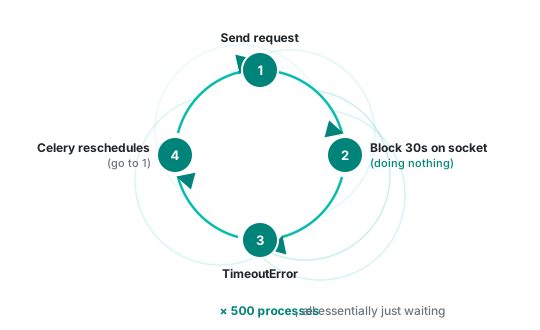
GitHub’s outage has suddenly, unexpectedly become our partial outage.
This is what the circuit breaker is for. It saves our resources, so we aren’t wasting them on pointless requests.
Once the circuit breaker is in place:
- API requests fail fast, an Exception is immediately returned, workers are immediately freed
- we can schedule Celery retries further apart, they are scheduled at the time, when it makes sense to test the API again
Ok, so how does one build a circuit breaker?
The mechanics of a circuit breaker
The mechanics go like this:
The Circuit Breaker sits in a middleware for all of your HTTP requests, so it can inspect every HTTP request your app makes.
It has 3 states:
CLOSED: this is the default state, it lets all requests through as usualOPEN: all requests are blocked, it immediately raises aCircuitBreakerExcHALF-OPEN: it allows 1 request through to test if the remote API is working already. If this 1 request fails, we go back intoOPEN, else we go intoCLOSED.
A note on the naming: Circuit breakers come from electrical circuits. They are physical switches that control the flow of electricity. This is why a CLOSED breaker means “everything is flowing normally” and an OPEN breaker means “blocked”.
A note about HALF-OPEN state: it actually lets at least 1 request through. It lets as many requests through as arrive until the first response causes the breaker to transition to either CLOSED or OPEN state. If the probe succeeds, the breaker goes into CLOSED, otherwise it goes back to OPEN, but with a doubled timeout.

It collects HTTP failures: 5XX responses and Connection-level exceptions. Once enough of them happen it changes its state to OPEN.
Rabbit hole: What counts as a failure?
- any 5xx response
- anything that prevents us from getting a response, like a timeout or a connection error or a DNS failure
Most importantly, none of the 4xx errors is counted as a failure. Especially not the 429 rate-limit response.
What we are after is detecting an API-level outage. So, not something that happens per-user or per-token, but a situation where the API is not responding even though we are sending it a 100% correct request.
However, because APIs tend to have custom solutions, it can happen that the rules need to be bent sometimes.
Usually the code starts off with the above rule, but then grows as we interact with various APIs first hand.
Rabbit hole: How many failures make an API outage?
Next, we must define the threshold for an API being degraded.
I went with a very simple 5 failures per minute. (At first it was 10 per minute, but after testing, 5/min worked better in our system.)
This really depends on the traffic and the APIs you are calling. There’s no universal “right” number.
You can choose to:
- care about the absolute count, so 5 failures per minute or 10 failures in 30 seconds
- or you can care about the rate of errors, as in: 50% of errors for every 20 requests
The absolute count reacts faster, the error rate seems more correct. It’s on you to build the rule for your system.
The OPEN state is always initiated with a timeout. For the duration of the timeout, no HTTP requests will be allowed through. We will raise CircuitBreakerExc instead of making the requests. Usually, this timeout is set to a fairly small number, like 1 second.
After the timeout (the 1 second) is over, we change the state to HALF-OPEN. In this state the breaker treats the next request as a probe. If the probe succeeds (=we don’t receive a failure), then the breaker goes back into CLOSED. Whereas, if it fails, then the breaker goes back into OPEN, but this time with a doubled timeout. If we started with a timeout of 1s, then the next timeout is 2s, the next is 4s, next is 8s.
At this point it is smart to select a maximum timeout. We’ve set it to 5 minutes. This way, if an API is down for 2h and then comes back, we will know at the latest 5 mins after they solve their problems.
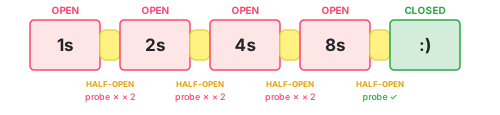
All together it might look somewhat like this:
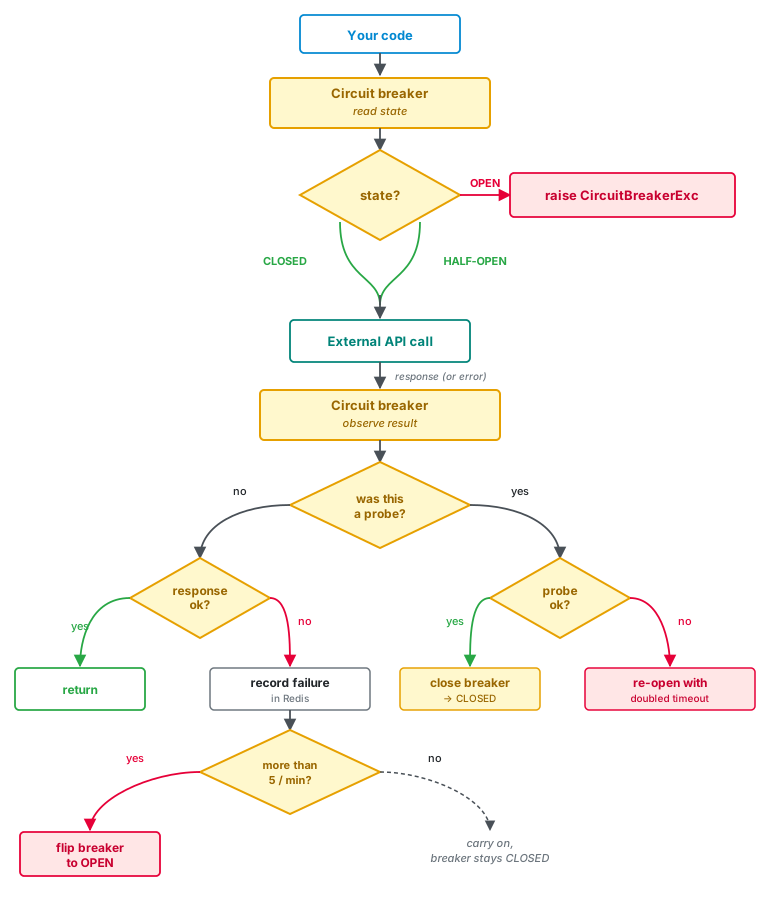
Storage
Since a circuit breaker is a small state machine, it needs to store its state someplace.
We store it in Redis. It’s important that the state is shared across all workers, so it can’t be stored in code. But any sort of database would work just fine.
There is surprisingly little data to store.
We decided to not store the state, but instead store enough data that state can always be calculated. This means no background job has to flip the state when timers expire, because the transition happens naturally the next time a request is processed.
Thus, we store just 4 Redis keys, all with domain names in the keys:
http.breaker.github.com.failuresstores timestamps of every failurehttp.breaker.github.com.is_openis a booleanhttp.breaker.github.com.open_startstores the timestamphttp.breaker.github.com.open_timeoutstores number of seconds
We also set a 2h-TTL on each of these keys. If no requests are made to some domain, then an OPEN breaker automatically closes. After all, failures from two days ago shouldn’t be allowed to harm requests today.
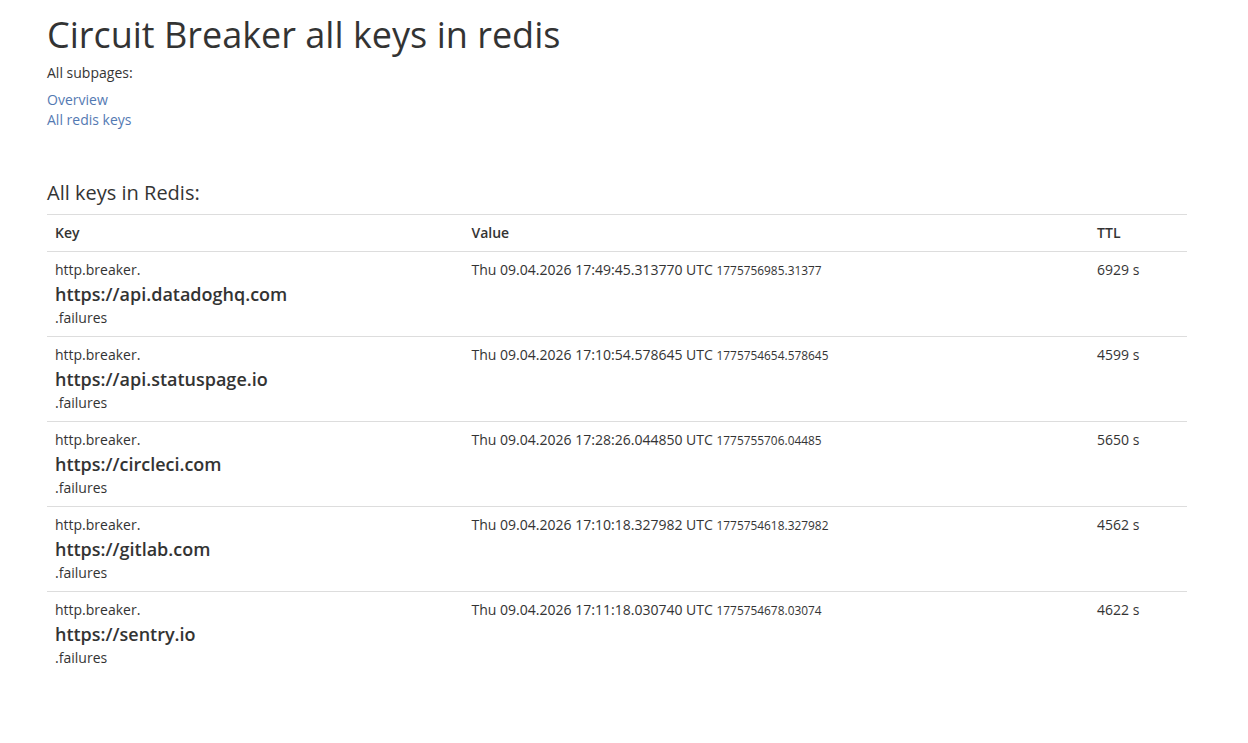
Add a quick dashboard
As I was deploying this logic, it quickly dawned on me that I also needed a simple dashboard that lets me see the current state.
If I know that GitHub’s API is down, I would want to check if our circuit breaker correctly understands this.
I’d also want to know when new requests will be allowed again.
This is especially useful in the testing period, but it becomes equally helpful later on, when support needs to maintain the app.
Here’s a simple example. All we can see here is the list of failures, other values would appear if an API were actually degraded:
Plugging it into your HTTP calls
In Python’s requests library, the easiest place to put the breaker is in an HTTP adapter. The HTTP adapters are the middleware of HTTP requests: every request goes through the adapter’s send() function.
import requests
from requests.adapters import HTTPAdapter
from requests.models import Response

# ↓ Our custom adapter. It extends requests.HTTPAdapter.
class CircuitBreakerAdapter(HTTPAdapter):
    def send(self, request, **kwargs):
        breaker = CircuitBreaker(request.url)
        # Step 1: before the request
        if breaker.is_domain_blocked():
            raise CircuitBreakerExc(...)
        # The actual request
        try:
            response = super().send(request, **kwargs)
        except RequestException as exc:
            # Step 2a: the request raised
            breaker.check_response_and_adjust_breaker(response=None, error=exc)
            raise
        # Step 2b: the request returned a response
        breaker.check_response_and_adjust_breaker(response, error=None)
        return response

def new_session():
    session = requests.Session()

    # TODO: here comes other common HTTP code
    #  like setting headers or retry strategy or ...

    # ↓ Here our adapter is "mounted" onto the session object.
    # We mounted it onto 2 partial URLs: http and https, because the idea
    # behind adapters is that they define the rules of interaction for
    # one, specific, external API. But by saying "http://" we are tying these
    # rules to the whole traffic (except ftp:// and such of course).
    adapter = CircuitBreakerAdapter()
    session.mount("https://", adapter)
    session.mount("http://", adapter)
urllib3’s automatic retry logic
The urllib3 library has automatic retry logic that is often turned on in production projects.
What it does is retry HTTP requests when they fail.
Devs (and LLMs) often copy-paste a line like this: retries = Retry(connect=3, read=3, total=3).
The problem with this is that retries triggered by this setting ignore all HTTP adapters, and with them our circuit breaker.
If an HTTP request returns a 503 twice, but on the 3rd try it returns a 200, then our app will see only the 200. The breaker records zero failures from this sequence, because the two intermediate 503s are completely invisible to it.
Session.send()
└─→ HTTPAdapter.send() ← called ONCE per logical request
  └─→ HTTPConnectionPool.urlopen()
      ├─→ attempt 1   (fails)
      ├─→ Retry.increment()  → new Retry object
      ├─→ attempt 2   (fails)
      ├─→ Retry.increment()  → new Retry object
      ├─→ attempt 3   (succeeds, or final failure)
      └─→ returns the final result
For this reason, we need to insert our breaker into the retry logic. And we do this by subclassing the Retry-class:
import urllib3

class RetryAndTellTheBreaker(urllib3.Retry):
    def increment(self, method=None, url=None, response=None, error=None, _pool=None, _stacktrace=None):
        new_retry = super().increment(method, url, response, error, _pool, _stacktrace)
        if _pool and isinstance(_pool, urllib3.HTTPConnectionPool):
            CircuitBreaker(_pool, request_path=url).check_response_and_adjust_breaker(
                response=response, error=error
            )
        return new_retry
The increment() method is called once per retry attempt, and the breaker records the response every time. The original adapter-level breaker is still needed, but so is this fix to the retry logic.
The CircuitBreakerExc exception
I made CircuitBreakerExc subclass requests.RequestException instead of just Exception. By using the same base class as other requests errors, my app can already generally handle this exception. I don’t need to add any new code to callers. The breaker becomes thus invisible to code that doesn’t care about it specifically.
The other thing about this class is that I raise the exception with all the parameters I have, so that if I wanted to know what exactly went wrong, I would have the domain and the time data about the OPEN state:
import requests
from datetime import datetime

class CircuitBreakerExc(requests.RequestException):
    def __init__(self, *args: Any, domain: str, open_timeout: int, started_at: datetime | None, **kwargs: Any):
        self.domain = domain
        self.open_timeout = open_timeout
        self.open_started_at = started_at
        super().__init__(*args, **kwargs)
Conclusion
The circuit breaker had a big effect on our resources.
As soon as we let it into production, we experienced fewer Celery issues.
The most important thing is that the blast radius of any one downed API got smaller. It didn’t have the knock-on effect of overwhelming our Celery workers and blocking other code.
It’s ironic how this thing that looked like nothing more than “good manners”, like something that would benefit some external API but not us, turned out to be very much an act of self-defence for our app. It turned out to be crucial for our code and our resources.
Next chapter
⏭️ Deep-dive #1: Why a Slow API Is Worse Than a Dead One