I always wanted to have this. The cool part of me wanted me to be the one who writes it, the pragmatic part just wanted to have access to a list like this, and the hedonistic part kept whispering that surely there are greater joys in life than documenting the mock library… no matter how magnificent the result might eventually become.
But here I am, some years later, in the wrath of the epidemic lockdown, re-running Python tests in an infinite loop until I figure out which knobs and settings of this mock library I have to turn and set to get it to mock the damn remote calls.
So I finally gave in and wrote this down. This is the list I wish I had.
There are people out there who will tell you that you should never mock anything, ever, that mocking is a code smell and you should refactor until you don’t need mocks. Handle their stance like you would any absolutist: with suspicion. Writing tests is less about moral purity and more about preventing bugs before your users find them.
In this post
Creating Mock objects
The docs tell of all the ways mock objects can be created, but they don’t make it obvious what the practical differences are between them. So, let’s remedy this now. We have 3 mock classes:
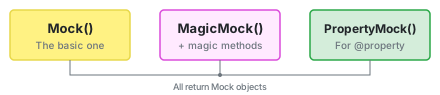
MagicMock is just Mock with dunder methods pre-configured (__len__, __iter__, __getitem__, etc.). Use MagicMock when your code does len(obj) or obj[0]. Otherwise, Mock is fine.
And PropertyMock is for mocking @property descriptors on classes.
Below I’ve listed mock-examples. I’ve sorted them by what you are trying to mock, by what the code does that you are trying to mock. Find your pattern, see how to set it up.
Code: book.title
A simple property:
book = Mock(title="Russian Literature")
book.title  # -> "Russian Literature"
book = Mock()
book.title  # -> <Mock name='mock.title' id='...'>
Code: book.author.first_name
A property of a property is straightforward:
book = Mock(author=Mock(first_name="Tatjana"))
book.author.first_name  # -> "Tatjana"
# or set it after creation
book = Mock()
book.author.first_name = "Evgenij"
book.author.first_name  # -> "Evgenij"
book = Mock()
book.author.first_name  # -> <Mock name='mock.author.first_name' id='...'>
Code: book.author.get_full_name()
A function needs return_value. Every time you see () in code (with or without arguments), you need to add one .return_value:
book = Mock()
book.author.get_full_name.return_value = "Aleksandr Pushkin"
book.author.get_full_name()  # -> "Aleksandr Pushkin"
book = Mock()
book.author.get_full_name()  # -> <Mock name='mock.author.get_full_name()' id='...'>
Code: author.name ⚠️
The Mock class uses name parameter internally for its string representation, which means… we can’t set name the same way we set title above.
❤ What we want is:
author = Mock()
author.name = "Pushkin"
author.name  # -> "Pushkin" ✓
💀 How we think it works, but doesn’t:
author = Mock(name="Pushkin")
author.name  # -> <Mock name='Pushkin.name' id='...'> ✗
Always set name as an attribute after creation, never in the constructor.
Implicitly creating sub-Mocks
When we are mocking a deeply nested attribute, we don’t need to explicitly create sub-Mocks at every level. As soon as we access an attribute/function/property, a new Mock will automatically be created (if none exists already).
We can use this to our advantage and use mock_object.author.country().title = "Lichtenstein" instead of mock_object.author = Mock(country=Mock(return_value=...)).
Code: book.data["reviews"][0].date
Paths with [0] or ["key"] need MagicMock:
book = MagicMock()
book.data["reviews"][0].date = datetime.now()
book.data["reviews"][0].date  # -> datetime(...)
Using just Mock will raise an error:
book = Mock()
book.data["reviews"]  # -> TypeError: 'Mock' object is not subscriptable
Code: len(book.data["reviews"])
len means we need to set a value for __len__. Python has lots of __-methods you can set values to.
book = MagicMock()
book.data["reviews"].__len__.return_value = 120
# -> 120
Code: book.get_review(type="oldest").reviewer.get("name", "unknown")
The arguments of function calls aren’t relevant for Mock by default. If you need them to be relevant, then what you are looking for are side_effects and I talk about them further down.
book = Mock()
book.get_review.return_value.reviewer = {"name": "Natalia"}
# -> "Natalia"
book = Mock()
book.get_review.return_value.reviewer = {}
# -> "unknown"
Code: book.all_reviews[-1].get_country(locale="en").reviewer.get("name")
-1 is no more special than 0 or 12345:
book = MagicMock()
book.all_reviews[-1].get_country(locale="en").reviewer = {"name": "Natalia"}
# -> "Natalia"
Rabbit hole: Finding the path you need to mock
Sometimes it’s hard to figure out what exact path we need to set up.
The trick is to just create a Mock(), call your code, and print out the mocked value:
a = Mock()
result = a.b(c, d).e.f.g().h()
print(result)
# -> <Mock name='mock.b().e.f.g().h()' id='14050'>
That name string shows you the exact path. Now replace every () with .return_value:
a.b.return_value.e.f.g.return_value.h.return_value = "My Result"
The mock literally tells you how to configure it.
Making mocks stricter with spec
By default, Mock returns a value for every call, every attribute, every method, even a typo. This is convenient most of the time, but sometimes you want to test that a specific property does NOT exist. What does one do then?
Introducing the spec parameter. spec restricts the mock to only allow attributes that exist on a real class or that you manually list.
@dataclass
class Book:
    title: str
    author: str

mock_book = Mock(spec=Book)
mock_book.title  # -> <Mock ...> (allowed)
mock_book.titl   # -> AttributeError! (not on Book)
Now your mock fails fast when you access something that doesn’t exist.
Spec can be defined with a class, or its instance:
mock_book = Mock(spec=Book("", ""))
Or it can be defined with just a list of attributes:
mock_item = Mock(spec=["id", "name", "save"])
Use spec when you want to catch typos or are testing code with hasattr().
Code: item.get_full_title() if hasattr(item, "get_full_title") else item.summary
When we call it without spec:
mock_item = Mock()
hasattr(mock_item, "get_full_title")  # -> true
# code result-> <Mock name='mock.get_full_title()' id='135821416274720'>
When we call it with spec:
mock_item = Mock(spec=["summary"], summary="A criminal story")
hasattr(mock_item, "get_full_title")  # -> false
# -> "A criminal story"
When we call it with spec that includes get_full_title:
mock_item = Mock(spec=["get_full_title"])
mock_item.get_full_title.return_value = "My title"
hasattr(mock_item, "get_full_title")  # -> true
# -> "My title"
The unfortunately named side_effect
Every Mock can have a side_effect. The name is… well, it’s a bad name, because this thing does three completely different things depending on what you pass it, and only one of them could honestly be called a “side effect”.
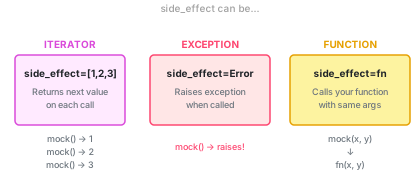
side_effect as an iterator
Say you’re testing pagination logic that calls an API multiple times:
def fetch_all_channels() -> list[str]:
    all_channels = []
    cursor = None
    while True:
        channels, cursor = fetch_page(cursor)
        all_channels.extend(channels)
        if cursor is None:
            break
    return all_channels
You need fetch_page to return different values each time it’s called:
fetch_page = Mock(side_effect=[
    (["channel_1", "channel_2"], "next_cursor"),  # first call
    (["channel_3"], None),                         # second call
])

result = fetch_all_channels()
# -> ["channel_1", "channel_2", "channel_3"]
Each call consumes the next item in the list. After the list is exhausted, you get StopIteration.
side_effect as an exception
This one is for testing Exception-handling.
def connect_github(user, github_uid):
    try:
        user.social_accounts.add("github", github_uid)
    except AlreadyClaimedException:
        return False, "This GitHub account is already connected"
    return True, "Connected!"
user = Mock()
user.social_accounts.add.side_effect = AlreadyClaimedException

success, msg = connect_github(user, "abc123")
# -> (False, "This GitHub account is already connected")
You can also pass an exception instance if you need a custom message:
user.social_accounts.add.side_effect = AlreadyClaimedException(
    "GitHub account abc123 already connected to another user"
)
side_effect as a substitute function
This is the most powerful use, but also the one that can make your tests frail. Here, you specify a replacement method. The Mock object will call your mock-function instead of the real function with all the same args and kwargs.
def create_url(endpoint: str, **kwargs) -> str:
    # real implementation hits a URL router
    ...

# In tests, we can substitute with something simpler:
def fake_create_url(endpoint: str, **kwargs) -> str:
    return f"{endpoint}?{kwargs}"

create_url = Mock(side_effect=fake_create_url)

create_url("users", id=5)  # -> "users?{'id': 5}"
We tie the mock function to the real function. When the real function changes we need to manually update the test function too.
return_value vs side_effect
Use return_value when you just want to set what gets returned. Use side_effect when you need different returns per call, exceptions, or custom logic.
Tracking how mocks were called
Sometimes we don’t care what a function returns, we want to know if a function was called or not.
Example: when a user clicks a button we call github to get the number of open PRs. We want to test that clicking the button successfully creates a request to github, we don’t much care what the num of open PRs is.
The assertion methods
mock_func = Mock(return_value="done")

# Call it a few times
mock_func(100, name="Natalia")
mock_func(200, name="Evgenij")
# Was it called at all?
mock_func.assert_called()

# Was it called exactly once? (this would fail - we called twice)
mock_func.assert_called_once()  # -> AssertionError!

# Was the LAST call with these args?
mock_func.assert_called_with(200, name="Evgenij")

# Was it called with these args at ANY point?
mock_func.assert_any_call(100, name="Natalia")
When we want to make sure nothing happened
A special example is assert_not_called, because sometimes we want to test something did NOT happen (example: we got the data from the cache instead of calling github or the DB)
mock_func.assert_not_called()
When you don’t care about all arguments
Sometimes you want to verify a call was made with some specific argument, but you couldn’t care less about the others. There’s ANY for that:
from unittest.mock import ANY

mock_func.assert_called_with(ANY, name="Natalia")
# -> passes! We don't care what the first arg was
Checking multiple calls
from unittest.mock import call

mock_func.assert_has_calls([
    call(100, name="Natalia"),
    call(200, name="Evgenij"),
])

# Order doesn't matter with any_order=True
mock_func.assert_has_calls([
    call(200, name="Evgenij"),
    call(100, name="Natalia"),
], any_order=True)
Starting fresh between tests
When reusing mocks (which I do very often, I like to test series of slightly different scenarios when the code is important), use reset_mock().
mock_func(100, name="Natalia")
mock_func.assert_called_once()  # -> true
mock_func.reset_mock()
mock_func.assert_not_called()
# -> true again, because we reset the mock
Patching: mocking things you can’t reach
Until now, we’ve been creating Mock objects directly, which is fine when you control the object you’re passing in. But in real code, you often need to mock something that’s imported deep inside the module you’re testing, something you can’t really access and thus can’t really pass in as an argument.
patch lets you replace an object at a specific import path.
Here’s our code example:
# my_app/services.py
from my_app.clients import slack_client

def notify_user(user):
    slack_client.send_message(user.slack_id, "Hello!")
We want to test notify_user(). Its input is user, but we need to mock slack_client.
We write the test with @patch(<path-to-slack_client>):
from unittest.mock import patch

# here
@patch("my_app.services.slack_client")
def test_notify_user(mock_slack):
    notify_user(some_user)
    mock_slack.send_message.assert_called_once()
The path in patch has to be the full path to the relative! location/target of the Thing We Mock. So, in our case, slack_client is imported in my_app/services.py, so we have to say my_app/services + slack_client <= name of the Thing We Mock.
This trips up everyone, and it still trips me up if the path is very complex.
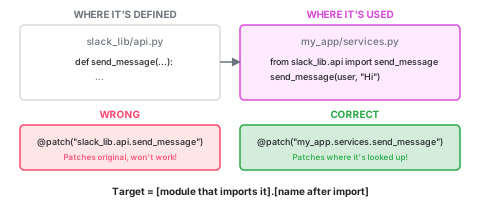
Building the patch target
The pattern is: [module.that.imports.it].[name.after.import]
# If services.py has:
from slack_lib.api import send_message
# Then patch:
@patch("my_app.services.send_message")
# If services.py has:
from slack_lib import api
# Then patch:
@patch("my_app.services.api.send_message")
# If services.py has:
import slack_lib
# Then patch:
@patch("my_app.services.slack_lib.api.send_message")
Patching a method on a class
We can also limit the patching to just 1 property, 1 function of some import.
# my_app/services.py
from slack_lib.api import SlackClient

def notify(user):
    client = SlackClient()
    client.post(user.id, "Hello")
@patch("my_app.services.SlackClient.post")
def test_notify(mock_post):
    notify(some_user)
    mock_post.assert_called_once()
patch as decorator vs context manager
When patch is a decorator, the function receives the mock object as an argument:
@patch("my_app.services.slack_client")
def test_something(mock_slack):
    ...
When it’s a context manager, we can get the mock object in as mock_value:
def test_something():
    with patch("my_app.services.slack_client") as mock_slack:
        ...
Multiple patches (the bottom-up gotcha)
When stacking decorators, they apply bottom-up, which means the arguments come in reverse order:
@patch("path.to.thing_a")  # applied third -> third argument
@patch("path.to.thing_b")  # applied second -> second argument
@patch("path.to.thing_c")  # applied first -> first argument
def test_something(mock_c, mock_b, mock_a):  # reverse order!
    ...
patch.object - when you have a reference
As far as I can see patch.object() works exactly the same as patch(). The only difference is that patch takes a string as the target while patch.object needs a reference. patch.object is thus used for patching individual functions of a class.
If you’ve already imported the thing you want to patch, patch.object lets you pass the reference directly instead of a string path:
from slack_lib.api import SlackClient

@patch.object(SlackClient, "post")
def test_notify(mock_post):
    ...
Patching a @property
Properties are special because they’re descriptors, which means you can’t just patch them like regular methods. You need PropertyMock.
Our code:
# models.py
class User:
    @property
    def full_name(self) -> str:
        return f"{self.first_name} {self.last_name}"
and here a test of the property full_name:
@patch.object(User, "full_name", new_callable=PropertyMock)
def test_something(mock_name):
    mock_name.return_value = "Janette"
    user = User()
    user.full_name  # -> "Janette"
Patching constants
For constants, use the patch(..., new=...).
Here’s some code with a constant:
# constants.py
MAX_RETRIES = 3
# my_app/services.py
from config import MAX_RETRIES
@patch("my_app.services.MAX_RETRIES", new=10)
def test_with_more_retries():
    # MAX_RETRIES is now 10 inside services.py
    ...
Note: when using new no mock_obj is passed into the test function.
Quick reference
For when you just need to copy-paste something and get on with your life:
from unittest.mock import Mock, MagicMock, patch, PropertyMock, ANY, call

# Basic mock
m = Mock()
m = Mock(return_value="value")
m = Mock(side_effect=Exception("boom"))
m = Mock(side_effect=[1, 2, 3])
m = Mock(side_effect=lambda x: x * 2)
m = Mock(spec=SomeClass)

# Setting nested attributes
m.foo.bar.baz = "value"
m.foo.bar.return_value = "value"

# Patching
@patch("module.path.thing")
@patch.object(SomeClass, "method")
@patch("module.path.CONSTANT", new=42)
@patch.object(SomeClass, "prop", new_callable=PropertyMock)

# Assertions
m.assert_called()
m.assert_called_once()
m.assert_called_with(arg1, arg2, key=val)
m.assert_called_once_with(arg1, arg2)
m.assert_any_call(arg1, arg2)
m.assert_has_calls([call(1), call(2)])
m.assert_not_called()

# Using ANY for flexible matching
m.assert_called_with(ANY, name="specific")
This was supposed to be a quick reference. Certainly, this is not the limit of the mock library, but I’m already looking forward to utilizing this summarized version of how Mocks should be constructed instead of reading through the longer (and more precise) official documentation or googling various StackOverflow answers.
And who knows, maybe it will someday be of use to some other mock-frustrated programmer soul, who will be gladdened to have found this post.