⏮️ Previous chapter: Pattern #3: Circuit Breaker design pattern
You run a service with inbound traffic you don’t control (users, webhooks, a queue), and to serve each request you have to call a third-party API. Then this API becomes degraded, it’s still kinda working, but it is slow. Now my question is: how exactly can this degraded external API cause your app to become unresponsive?
I mean, I get the general gist of it: as the API calls become slow, things pile up and once more things pile up than can be processed everybody waits. And since we have no control over the inbound traffic that is triggering the API calls, we can’t just stop making them.
But what exactly piles up and what are the mechanisms we can use to handle the pile up?
Disclaimer: we don’t care what exactly is wrong with the remote API. Our request is probably stuck in some queue on their end, it could be waiting for a free worker, it could be waiting for DB access while a worker is already processing it, or it could even be in the TCP accept queue, an OS-owned queue and their app doesn’t even yet know a request is waiting. Whatever it is, we don’t care. We only care about what our side can do.
In this post
No default timeouts
First the basics: if we are waiting for a slow API, how long are we expected to wait?
There are, technically speaking, no default timeouts defined by HTTP protocol itself. So, technically, we could be waiting forever.
The remote API’s servers can set various timeouts, but we want to build a resilient app on our side, so we have to assume they have NO timeouts in place, because that is the worst case scenario.
Most code libraries for HTTP requests also don’t set default timeouts, because, … they are built around raw socket API, which is usually part of a language’s standard library and follows the HTTP protocol. So,.. you should probably go check the defaults in your code right now :-D.
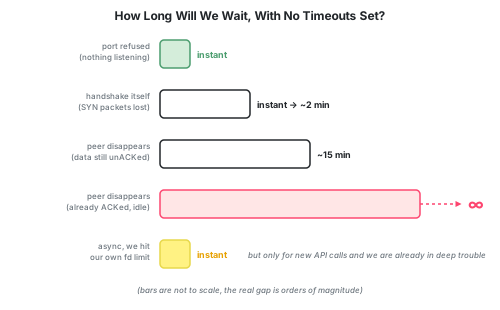
So, how long will we wait, if we also set NO timeouts?
And let’s keep this in mind: a simple API call is usually a few hundred ms, let’s say 200ms.
- The remote server refuses the connection, nothing is listening at our port. => Instant rejection, no wait time.
- The TCP handshake takes a long time, because some of our
SYNpackets get lost. => Linux will retry with a backoff, so the handshake either succeeds at some point, or we get a connect error after roughly ~2 minutes. - The remote server disappears mid-conversation AND it never sent
ACKfor our last message. => TCP protocol will notice this and act. It will re-transmit a fixed number of tries, and it will back off between attempts. But the default timeout on Linux machines for this scenario is a whopping 15 minutes. - The remote disappears mid-conversation, but it already sent
ACKfor everything we sent. => TCP doesn’t do anything, because nothing on the connection looks off. We will wait forever. - We’re running
asynccode, the API calls are non-blocking. => We still keep piling up more and more stuck connections and hit the resource limit. It is only then that every new API call will fail immediately, but the old calls are still waiting forever.
One thing that SREs will probably shout about now is the TCP keepalive, SO_KEEPALIVE, which occasionally probes an idle connection to check that the peer is still there. Except it’s disabled by default on most platforms, and has to be explicitly turned on by the application. It is usually a well hidden setting, but even if we did turn it on, Linux’s defaults are to wait 2 hours before the first probe, then send 9 probes 75 seconds apart before giving up.
Evidence: "no default timeout" in libraries
Python: the requests library defaults its timeout to None, and its own documentation directly says: “By default, requests do not time out.”
Go: http.DefaultClient’s Timeout field defaults to its zero value, which means no timeout, wait indefinitely.
Node.js / JavaScript: the built-in http.request() applies no timeout, unless you explicitly pass a timeout option or call request.setTimeout() yourself. fetch() is kinda even worse, because it has no timeout option at all. The only way to bound it is to bolt on an AbortController and call setTimeout() on it (or use the newer AbortSignal.timeout(...)).
Setting our own timeouts
What timeouts can we set on our side?
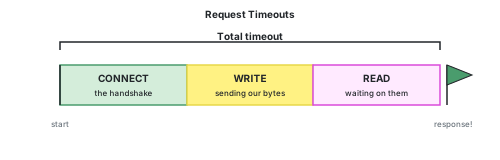
Read timeout: set this timeout first. It starts once your request has been fully sent and ends the moment response starts arriving. This is the best timeout to address the topic of this whole post.
Connect timeout: ends when the TCP handshake completes. Set this next. It only guards against a slow or failed handshake (an unreachable host, dropped SYN packets), not against a server that connects instantly but is slow to actually respond, that’s the read timeout’s job.
Retry count/policy: obviously this isn’t a timeout, but it is the next thing I would set. We should retry at least 1x, because of transient errors. Sometimes, for some reason, the API just has a bad moment and will momentarily give you a faulty response. We need to retry. But, we must retry only 2 or 3 times and with an exponential backoff.
Retries can make this exact situation, the topic of this post, way, way worse. But we still need them, because of the transient API errors.
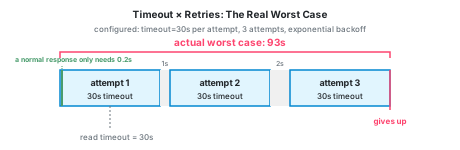
There are more timeouts to set, but if we set only the 3 settings above, we should be good.
Now comes the bigger question: what should we set them to?
Usually, a good rule of thumb is to see how long your API calls usually take and set the timeouts to help guide you. But my experience is.. you set the timeouts globally, and then you call 50 different APIs, from 50 different companies, so… what does an average even mean in this case?
Blocking vs non-blocking requests
HTTP requests are I/O like any other, and I/O comes in two modes: blocking or non-blocking mode.
Blocking was the original mode. It meant that a process would send the API call and then be tied down waiting, doing nothing else, until the response arrives.
But, as the internet expanded and we now routinely expect (and wish for) millions of users per day to any humble app, we adopted the non-blocking mode. Instead of the process (or thread) waiting, it can do other stuff. Maybe send another hundred API calls to several providers.
In the blocking mode, the OS suspends the thread that made the API call. It will only wake up once the call resolves to something, anything. For this reason we resort to spinning up lots of worker threads, so users don’t need to wait for one another.
In the non-blocking mode, there’s no pool of worker threads anymore. The single thread makes all the API calls, because it doesn’t wait for a response. It gets back to processing the response only once the response arrives. When the response takes a longer time to arrive, we are technically free to execute other tasks, that is if we have these other tasks that need to be executed.
It sounds like we should just switch to non-blocking requests and we’ll solve our problem.
The limit of the pool
If we use blocking API calls, then we are limited by how many threads we can realistically keep alive at once. Threads eat up memory, they compete for shared resources like the database connection pool, and the OS’s scheduler has overhead switching between them.
If we use non-blocking API calls, then we are still limited by the shared resources, like the database.
But in either case, we are always limited by the max number of allowed open connections. Every open connection is still a file descriptor, and every OS process has a limit on how many it can have open at once (ulimit -n). You can raise that limit to thousands or even a million, but you can’t make it go away.
Example with numbers
Say we run a pool of 20 workers, we run blocking calls, and a normal call to this API takes 200ms.
One worker can do max \(\frac{1s}{0.2s} = 5 \frac{calls}{second}\). Twenty workers, running in parallel, can do:
\[20 × 5 = 100 \frac{calls}{second}\]Now the API degrades to 8s per call. This changes our ceiling:
\[20 × \frac{1s}{8s} = 2.5 \frac{calls}{second}\]If the API’s speed decreases by 40x, then our throughput also decreases by 40x.
In order to serve the same number of requests as before, we then have to increase our resources by 40x. This means running 800 workers, which is surely over the limit of our system, given that we normally have only 20 of them.
But, let’s say new requests only keep arriving at 20 requests per second. So, way below our original max. The queue fills up crazy fast.
| After | Processed | In Queue |
|---|---|---|
| 1s | 2 | 18 |
| 2s | 5 | 35 |
| 1 min | 150 | 1 K |
| 5 min | 750 | 5.25 K |
| 1 h | 9 K | 63 K |
| 3 h | 27 K | 189 K |
Don’t focus on the scale of the numbers, focus on the relationships between them.
The queue length is actually optimistic, it assumes nothing major breaks and our code isn’t retrying any API calls. But, let’s be honest, the code probably re-tries failed API calls, that is like API calling 101.
The overflow
The problem is that our app isn’t only doing API calls and it isn’t calling just the 1 degraded API.
With blocking requests, we eventually run out of workers, with non-blocking requests, we eventually run out of file descriptors. Or it could also be memory or DB connections or something else. Either way, at that point no new tasks can be executed, no extra work can be done and the old workers/threads/processes are stuck waiting.
In blocking mode, new requests are stuck in a queue waiting for a free worker. In non-blocking, they are immediately rejected, because the OS simply refuses to open one more connection.
But, we are now in the situation, where our app can’t execute new code, code that has nothing to do with API calling.
This is how a problem with one dependency spreads to code that has nothing to do with it.
This is sometimes called a cascading failure: a failure in one part of the system has cascaded into other parts of the system.
A crack in 1 layer triggers a crack in a calling layer. […]
Cascading failures often result from resource pools that get drained because of a failure in a lower layer. Integrations without timeouts are a surefire way to create cascading failures.
One bad escalation from here on is that our instance can’t even process our health check. In which case our load balancer will stop sending requests to it, which is good news for this instance. But the traffic is still oncoming, so it will get re-routed to other instances, which are probably also near their breaking point from calling the same degraded API.
If this repeats across enough instances, it can take all instances down.
Of course, we then have safety checks in place that auto replace unhealthy instances. But, if the API doesn’t change for the better, then it is just a question of time before these new instances fail in the same way.
How helpful are the timeouts?
They are very helpful, you should always set them. But, they aren’t a miracle solution.
The main problem of timeouts is that they have to be set to a few times the average expected regular request time.
Sure, our average API call is done in 200 ms, but we get some regular responses also at 2s. (Some of the fault here might be ours, a cold TCP connection for every call makes us slower, because TCP starts every new connection cautiously (slow start) and likes to hold back small packets (Nagle’s algorithm). One more reason to keep a connection pool open, but that’s a different post.) Which means we will set the timeout to a few seconds, let’s say 5s. And we have to have re-tries, at least 1 retry, to handle the occasional transient API error. So, then we are in reality at timeout = 10s.
But our system is set up to handle API calls that on average take 0.2s, but suddenly the average is closer to 10s (50x more).
Unfortunately, our generous timeout does nothing for a slow-but-under-the-limit response.
But, let’s lower the timeout to 1s. Now every API call will time out. We will retry and that will also time out.
A much lower timeout means that every API call fails. But we are still doing them.
Working API: \(throughput = 100 \frac{calls}{second}\) and all workers work.
Slow API, but the timeout is not triggered: \(throughput = 2.5 \frac{calls}{second}\) and our workers are slow, eventually it will crash.
Slow API and a low timeout: \(throughput = 0\), but our workers are fast.
But now the question becomes: what does our code do when the API times out? If we just retry immediately, then we are just scheduling dead tasks. We are creating phantom tasks that will accomplish no work at all.
Flow summary
Let’s go back to the original question: what are the mechanics of this process?
- A slow API response holds a resource hostage: a worker if we’re blocking, a file descriptor if we’re not. Non-blocking requests have a limit too, just a much higher one, so more tasks pile up before the same thing happens.
- Some resources are shared and finite, like (usually) the DB connections pool, while also being crucial for every task.
- If a shared resource runs out (a DB connection), it (usually) cascades into every connected “system”, all the code that needs it.
- Retries can make this worse, but we can’t live without them.
It’s funny, how there are no clean solutions. Of course, you need timeouts, but they possibly won’t help at all. Of course, you need to retry API calls, but that can also be the cause for your incident.
Here’s an excerpt from “Release It!” about one particular incident where the regular retry used to work brilliantly, until one day it didn’t anymore:
Ultimately, the calling layer was using 100 percent of its CPU making calls to the lower layer and logging failures in calls to the lower layer.
What if the API was just dead?
Let’s compare this to the boring case: the API is completely down.
If it’s down explicitly (nothing is listening, the connection is refused, DNS doesn’t resolve), then every call fails instantly. Our workers are free again within milliseconds. Our throughput doesn’t drop at all, it’s just that every call fails. The queue never grows. The feature that needs this API is broken, sure, but the rest of the app doesn’t even notice.
If it’s down implicitly (the host is unreachable, packets vanish into a black hole), then without timeouts we’re back to waiting 2 minutes or 15 minutes or forever. So, this is exactly the case timeouts were made for. We can set a connect timeout and a read timeout and make the implicitly dead API becomes an explicitly dead one, with every call failing in a predictable few seconds.
So a dead API is a problem we can fully solve with timeouts. A slow API is not. A response that arrives in 8 seconds when the timeout is 10 looks perfectly healthy to every safety mechanism we have, and it still holds our worker hostage for 40x longer than it should.
It is simply that a dead API fails fast, while a downgraded API lingers.
Solutions
The question is not if you will experience an incident, but how fast you will recover, once the inevitable happens.
There is no magic bullet. But, what helps is:
Bulkheads: give each external dependency its own pool, so a slow GitHub can’t starve work that has nothing to do with GitHub. In Celery this can mean a dedicated queue per provider.
Circuit breakers: listen for API failures and stop calling them when they are broken. The advantage is already the simple fact that you immediately know the API is down, you don’t need to wait for any timeout to be reached. Calls to this specific API still fail, but your workers are free again instantly, so throughput for everything else isn’t hurt. But you have to again handle the retry yourself.
I wrote up how we actually built one of these in Pattern #3.
Concurrency limiter: a plain semaphore per API provider that limits the number of concurrent calls to some API. It doesn’t care if the API is slow or dead, it just refuses to let one provider hold more than 5 of our workers.
Load shedding: give every queued task an expiry. If a slow API has built up a backlog that we can’t drain in time, we drop the stale tasks instead of dutifully processing old work.
Anything else that caps how many requests are allowed per API provider. You can really be as creative at this as you want. Some solutions are more watertight, but they are also more expensive to maintain. You have to figure out what the right balance is for you.
And if you look closely, you can see, that all our “solutions” are just making a degraded API look like a dead API. Because, what we are really after is just to protect our workers, not to cover for the broken API.
Next chapter
⏭️ Pattern #4: Load Shedding, or Letting Tasks Expire on Purpose
External sources
- RFC 9110 — HTTP Semantics
- RFC 9112 — HTTP/1.1
- Release It! (2nd edition) — Michael T. Nygard
- Requests: Timeouts (official docs)
- golang/go#24138 — net/http's default client has no timeout
- Node.js http.request() — timeout option
- MDN: AbortSignal.timeout()
- tcp(7) — Linux manual page
- TCP_RTO_MIN, TCP_RTO_MAX and tcp_retries2
- Overriding the default Linux kernel connect() timeout (tcp_syn_retries)
- TCP Keepalive HOWTO
- SO_KEEPALIVE socket option (Winsock) — disabled by default
- Wikipedia: TCP congestion control — slow start
- Wikipedia: Nagle's algorithm