⏮️ Previous chapter: Deep-dive #1: Why a Slow API Is Worse Than a Dead One
Load shedding is the deliberate dropping of some work when your system can’t keep up. It’s about choosing which work to do and which to reject, even though the general expectation is that your system will always diligently service all requests.
It sounds sooo wrong, doesn’t it? We spend so much effort making sure every task runs, every retry is scheduled, every page is fetched… and now we are going to throw work away?
I wanted to write about this one mostly to give you (and myself, a few years ago) permission to refuse some work, …sometimes.
In this post
Towards infinity … and beyond
Every system has a limit somewhere.
It doesn’t matter how many servers you have or how great your load balancers are, every queue has a limit somewhere, even if that limit is very, very high. And the closer you get to it, the slower your system looks to your users.
As the queue marches towards infinity, the response times also march towards infinity.
Rabbit hole: Little's Law, the math behind the march towards infinity
Little’s Law goes like this:
\[L = \lambda \times W\]- \(L\) is the average number of tasks in the system (waiting in the queue or being processed)
- \(\lambda\) is the rate at which tasks arrive (and, in a system that keeps up, the rate at which they are finished)
- \(W\) is the average time one task spends in the system, from being scheduled to being done
For example: if 20 tasks arrive per second and each one spends 3 seconds in the system, then on average there are \(20 \times 3 = 60\) tasks in the system at any moment.
Logically, the following is also true:
\[W = \frac{L}{\lambda}\]The time a task waits is The Length of the Queue divided by how fast the queue moves. If our workers finish tasks at a fixed rate and the queue keeps growing, the waiting time has to grow with it. It’s simple math.
With the numbers from the example in Deep-dive #1: the slow API drops our workers to 2.5 finished calls per second, and after 1 hour we have 63K calls in the queue. A new call joining the back of that queue waits about
\[\frac{63000}{2.5} = 25200\]seconds… that’s 7 hours.
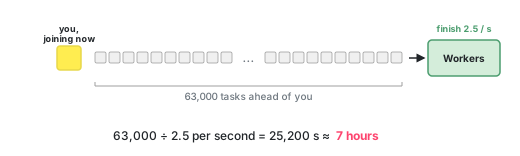
Of course, the rate of inbound requests can change at any time and the rate at which we process them too, but it’s good to have a starting point from which to understand the system.
At that point, dropping a few tasks can be the thing that gets you out of the incident.
It’s just like the philosophical trolley problem: you sacrifice a few for the good of the many.
How the backlog happens
In the example in Deep-dive #1 we looked at what a slow API does to our workers: every call holds a worker hostage for 40x longer than it should, throughput drops and the queue fills up fast. With 20 workers and 20 new calls per second coming in, we were at 1K waiting calls after 1 minute and at 63K after 1 hour.
Now let’s say the API recovers. Or we fix our workers. Or the circuit breaker kicks in. Whatever it is, the workers are free again and they start draining the queue… from the oldest task forward of course.
We will first process the oldest tasks, tasks that were scheduled 3 hours ago, to fetch data that was relevant 3 hours ago. Meanwhile, the fresh tasks, the ones that would give our users the current numbers, wait at the back. So even after the incident is technically over, our app keeps being slow and keeps showing old data, because it is dutifully working through the pile of work it is presented with.
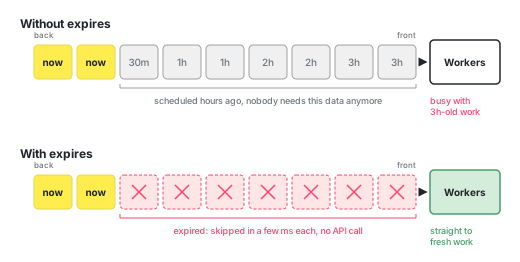
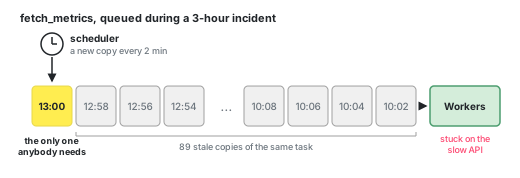
This is especially bad with periodic tasks, so tasks like “fetch the data every 2 mins” and “generate report every day”.
Give tasks an expiry date
The easiest solution is to give every task an expiry date when scheduling it.
When a worker picks up a task whose date has passed, it throws it away and moves on to the next task. The important parts are:
- the date is checked before the task starts
- we still lose a few milliseconds, because every task does get inspected individually
Most task queues have something like this built in: “expiry”, “TTL”, “time to live”.
Here’s an example for Celery:
CELERY_BEAT_SCHEDULE = {
    "send_daily_reports": {
        "task": "tasks.send_daily_reports",
        "schedule": crontab(minute=30, hour=23),
        "options": {"expires": int(timedelta(hours=23, minutes=0).total_seconds())},
    },
}
Which tasks to expire?!?
Of course, it took a few incidents before I added any expiry to the tasks in our system. I think, it takes a bit of cynicism to write code that throws tasks away, and cynicism takes a few incidents to build up.
So, when I was deciding what to throw away, I was thinking of it like this:
- Does this task lose value over time?
- Can something else cover for it?
You will never find a task where dropping it has zero consequences. We are always losing something. What we are doing is trying to minimize the “something”.
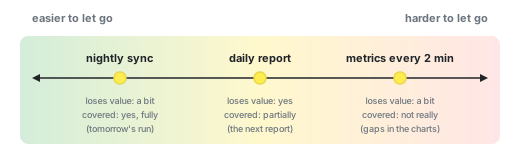
Here are 3 examples of tasks that we expired.
Expire example 1: The nightly sync
We had a few tasks that synced data from external services every night. We wanted them to run at night, when nobody is using the app.
If more than 6 hours have passed and the job still hasn’t started, we skip it for tonight. The task always syncs last 30 days of data, so tomorrow’s task should cover for today’s problem.
Loses value over time: a bit. Something else covers for it: yes, fully, as long as we manage to run it at least 1-2 times per 30 days.
Expire example 2: The daily report
Every day we would send out our daily reports. We gave this task an expiry of 23 hours.
Our reasoning was that users care much more about the latest numbers than about yesterday’s numbers.
Loses value over time: yes. Something else covers for it: partially, the next report.
Expire example 3: The metrics fetched every 2 minutes
This was the hardest one to expire.
Every 2 minutes we collected various metrics, we would trigger calls to various third-party APIs to collect these metrics.
During an incident these tasks would pile up and up and up and up VERY quickly. This is the reason why we expired them. They would clog up our pipeline and make it very hard to truly get out of an incident. The customers also, again, cared more about latest values: “is our system healthy NOW” instead of “was our system healthy 5h ago”. So we expired these too after 1 hour.
Loses value over time: a bit. Something else covers for it: no, not really.
It’s not great… but sometimes it needs to be done. Sometimes it’s not about being perfect, but about being operational.
Measure invisible tasks
A real problem of expired tasks is their invisibility. They don’t fail and don’t raise an exception, which means there is no error log and in general just very little trace that they ever existed.
Imagine the worst case scenario: you set up a task that expires every time it is scheduled. It never runs. How would you learn about it?
Add the logs and metrics you need to be able to track these events.
In Celery, you can use the task_revoked signal:
from celery.signals import task_revoked

@task_revoked.connect
def count_expired_tasks(sender, request, terminated, signum, expired, **kwargs):
    if expired:
        metrics.increment("celery.task.expired", tags={"task": sender.name})
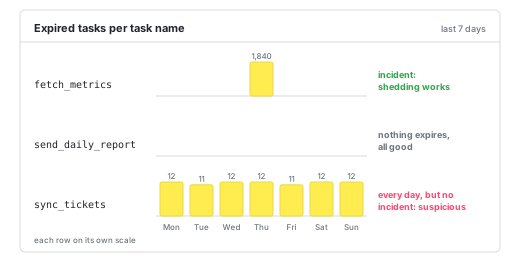
On top of this, feel free to build a dashboard where you show “expired tasks per task name”. This can help you during and after an incident, to get insight into the queues, but it will also help you outside of any incident, because load shedding in peace time is suspicious.
Conclusion
Load shedding isn’t elegant. It’s an admission that our system can’t do everything that is asked of it. But surely, it is better if we decide what gets dropped than if the system decides to kill itself.
Next chapter
⏭️ To be continued...