⏮️ Previous chapter: Pattern #4: Load Shedding, or Letting Tasks Expire on Purpose
A big part of your third-party API calls is defined by your users’ decisions: the data they provide. For starters, it is your users who need to perform some manual activity to get you a working access token. No access token, no working integration. No working integration, no working features.
People don’t have a lot of patience with an app that looks like its features don’t work, which is exactly what your app looks like when the integration behind those features can’t connect to the API.
If they are in the middle of setting up the integration, then they will try somewhat diligently to make it work. But what about when an integration that worked fine for 6 months or 2 years suddenly stops working?
The worst type of broken access token is an expired access token.
The user hasn’t changed anything, which makes them immediately want to put the blame on us. But we also haven’t changed anything, so we want to immediately put the blame right back on them.
But who is this blame game helping? It’s not solving the problem, but it is making us look incompetent.
For this reason, I would argue that putting some UX effort into the expired-token scenario would do our product and company a lot of good.
In this post
The lost contact
Do you know when tokens most often expire?
I’d say you won’t guess correctly…
It’s often when the person who set up the connection leaves the company.
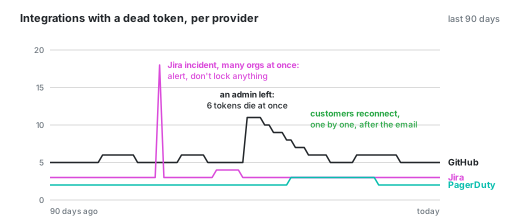
The old account gets deactivated somewhere, by some script that runs automatically after people leave, and every token tied to their account dies with the account (note: of course the org-level tokens survive together with lots of other “things” like webhooks and app installations and …).
This is the worst possible time for a token to expire, because the people who are left have no idea how the connection was set up, where the UI is, what permissions are needed, what the process is, where the buttons are… The one person who could help, who probably remembers (at least partially) how it all works, is not around.
What this looks like in the logs
This is how this pattern shows up in the logs:
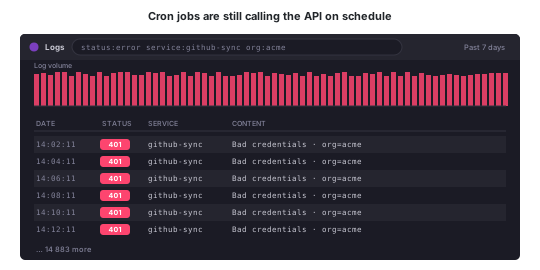
The integration is still tied into all of our features, the periodic tasks are still calling the API, and all the API triggers are still in place.
This can go on for days, weeks, months, until somebody figures it out.
Most often it takes the customer a very long time to figure it out.
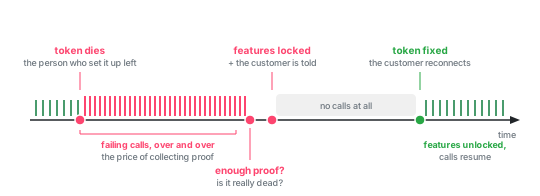
But this leaves us in the situation where we are wasting our resources (workers, CPU, memory, database requests, logging, metrics, …) on useless work. We keep making API calls in their name that all fail, from now into eternity.
Recognizing “Bad credentials”
In Pattern #1, But not all errors are made equal I wrote that a 401 is a problem we can fix, but outside of code: somebody has to go and get a new token. But before anybody can do that, our code has to recognize “the token is dead” as its own thing, and not as just another failed request.
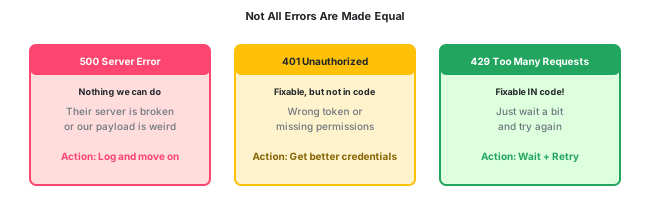
That’s harder than it should be, because every provider does it differently. Some send a 401, some a 403, some a 200 with an error in the body, and some lay a trap for you and send a 401 status code for things that have nothing to do with the token.
There is no way around it, you will have to manually address this for every provider you support.
The easiest way to communicate this to the rest of the code is with a dedicated exception class (e.g. IntegrationMisconfiguredException).
Essentially there are only 2 solutions
There are only 2 ways out of the broken-token situation:
- you convince the customer to fix their token
- or you build a system that recognizes a broken integration and disables certain features of your app, the ones that rely on the integration
Both are sub-optimal. Basing the reliability of your app on customers diligently fixing their data is… problematic. But building a smart system is expensive and complicated and, in the end, also won’t be 100% reliable.
I’ve built both in the past :-D. Why be happy with only 1 fence when you can build 2?
Solution 1: Beg your customers
When a token stops working, just go and tell your customer!
Seems so simple and obvious.
But is it?!? Because look at the apps that surround us. Most often this information is buried somewhere deep inside some nested settings page. That’s no help at all! The only reason for me to go looking into the 5th level of some settings page is if I already know the GitHub integration is dead.
So, please, tell me when my integration is broken. Tell me 2 things, 3 if you feel generous:
- my token is dead
- (optionally: this feature now doesn’t work because of it)
- and the most important part: here is a link to exactly the page where I set up a new token
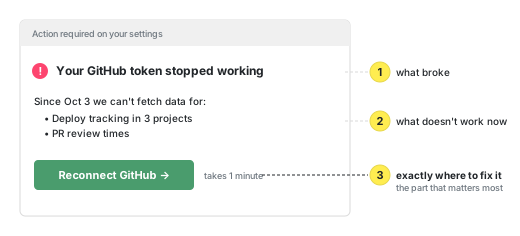
And! the page where I set up a new token needs to be sooo simple! This is where you should spend your UX time, because as we’ve discovered already: if the integration isn’t working, then your app’s features don’t work.
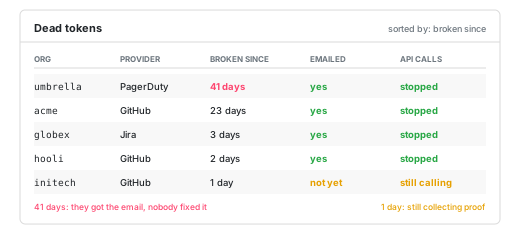
Our app was event-driven, so a broken integration meant no more events coming in, or no way to process the events that were coming in. We resorted to sending a “Your token is dead” email. It might seem a bit aggressive, but an app whose whole point is to listen to events, and that stops hearing any… is a dead app.
Solution 2: Lock up your features
To not be completely dependent on customers, I also built the 2nd defense: disabling certain features if the customer doesn’t fix their API token.
Internally I called it “ostracizing” an integration. I wanted to use a word that would have absolutely no other meaning, so I could search for it more easily. I love it when 1 word is used for only 1 feature, it makes maintaining a big codebase much easier.
Every day we would run ostracizing-tests. The point of the tests is to find enough proof that the integration is indeed broken on our side and that the problem is not temporary.
I don’t want to disable part of my app for any customer, so I made sure to err on the side of “ah, it’s probably still working”. However, it took some time for the integration to collect enough evidence that it truly is broken. During this time, we would have to accept that we will continue to be making foolish API calls that all end in “Bad credentials”.
Metrics and dashboards
All Bad credentials responses should be tracked, preferably per org and per provider. The same goes for every ostracized and de-ostracized event, again per org and per provider.
Ideally, all of this would be metrics per org and per provider. But then Datadog & co. want a lot of money for it, because they charge per tag combination. Sooo, maybe we go with metrics per provider, org IDs in the logs.
If we don’t count these events on purpose, we don’t know how many there are, and we can’t tell whether the emails and the ostracizing are doing anything and if they are doing too much.
It’s also nice for support to be able to easily see whose integrations have been ostracized.
Then there are other, harder-to-spot things we also need to keep an eye on:
- Unrecognized auth errors. We know that APIs are fickle, and we know they sometimes change unexpectedly, and we know we could not test for every imaginable scenario. Thus, if we get an error our code can’t easily sort into one of the known buckets, then log this too. Maybe it’s a new way of communicating “Your API token is broken”.
- False positives. The opposite might also be true. Maybe we misidentified an ordinary bad response as the broken token scenario. This can lead to us disabling a perfectly working integration.
- Provider-wide spikes. Finally, an example that is easy to measure. If we suddenly ostracize a lot of integrations of the same provider, then we probably have a bug in the code. This actually once happened to us, because our ostracize code ran during a GitHub outage and we weren’t yet as careful with this action as we then came to be.
Conclusion
In the end, the fix for a dead token is always a human action, and humans want their work to be simple and straightforward, so that’s what we did.